House, Gregory MD
Princeton-Plainsboro Teaching Hospital • W2Sep 1 – Sep 14, 2026
Princeton-Plainsboro - Diagnostic Medicine #2214
Princeton-Plainsboro Teaching Hospital
13 Shifts • 192 Hours • 0 Units • 3 Expenses


Problem
01
The timesheet overview lacked the visual hierarchy needed to identify what required action, and individual timesheets were dense and difficult to scan, making review slow and error-prone.
02
Without automated logic for overtime, gratis, and guaranteed hours, rate calculations had to be applied manually, introducing both errors and significant administrative overhead.
03
There was no easy way to compare scheduled shifts against submitted time, leaving approvers with no reliable way to verify that thresholds and differentials had been correctly applied.
04
Because only one timesheet was allowed per staff member per pay period, missed expenses had to be added to a later timesheet, pushing them outside the relevant pay period and creating reconciliation issues.
05
Errors that made it through approval had direct downstream consequences: delayed invoices, incorrect billing, and in some cases recalculation risk on already-processed line items.
Solution 1/2
Our redesign focused on clarity and actionability. Instead of a single, rigid table, we introduced two flexible views: a table layout for high-volume processing and a card view optimized for quick scanning and on-the-go decision-making. Both views present the same data: shift counts, hours worked, unit volume, and expense totals.
Each record now shows a complete picture: the total volume submitted, the assigned approver, and a real-time status indicator. Common statuses like “Pending Submission,” “Disputed,” and “Approved” are paired with contextual actions such as Submit, Resubmit, or Approve, available directly in-line. No extra clicks, no ambiguity.
For teams managing dozens or even hundreds of submissions, this update was transformational.
House, Gregory MD
Princeton-Plainsboro Teaching Hospital • W2Sep 1 – Sep 14, 2026
Princeton-Plainsboro - Diagnostic Medicine #2214
Princeton-Plainsboro Teaching Hospital
13 Shifts • 192 Hours • 0 Units • 3 Expenses
Grey, Meredith MD
Grey Sloan Memorial Hospital • W2Aug 18 – Aug 31, 2026
Grey Sloan Memorial - General Surgery #4401
Grey Sloan Memorial Hospital
8 Shifts • 96 Hours • 0 Units • 1 Expenses
Cox, Perry MD
Sacred Heart Hospital • W2Jul 21 – Aug 3, 2026
Sacred Heart - Internal Medicine #1102
Sacred Heart Hospital
10 Shifts • 120 Hours • 2 Units • 4 Expenses
Murphy, Shaun MD
St. Bonaventure Hospital • LocumSep 15 – Sep 28, 2026
St. Bonaventure - General Surgery #5518
St. Bonaventure Hospital
12 Shifts • 144 Hours • 0 Units • 0 Expenses
Ross, Doug MD
County General Hospital • LocumAug 4 – Aug 17, 2026
County General - Pediatric Emergency #3306
County General Hospital
6 Shifts • 72 Hours • 1 Units • 2 Expenses
Table and card views
Approvers see the same timesheet data in either layout: staff, practice, volume, assignee, and status. Toggle between a dense processing table and a more scannable card view.
The table is built for batch review. Columns keep volume, ownership, and status aligned so teams can scan and act without opening every record.
| Staff | Practice | Volume | Assignee | Status | Actions |
|---|---|---|---|---|---|
House, Gregory MDPrinceton-Plainsboro Teaching Hospital • W2 | Sep 1 – Sep 14, 2026Princeton-Plainsboro - Diagnostic Medicine #2214Princeton-Plainsboro Teaching Hospital | Shifts13Hours192Units0Expenses3 | Unassigned | Approved | |
Grey, Meredith MDGrey Sloan Memorial Hospital • W2 | Aug 18 – Aug 31, 2026Grey Sloan Memorial - General Surgery #4401Grey Sloan Memorial Hospital | Shifts8Hours96Units0Expenses1 | MEMorgan Ellis | Pending Submission | |
Cox, Perry MDSacred Heart Hospital • W2 | Jul 21 – Aug 3, 2026Sacred Heart - Internal Medicine #1102Sacred Heart Hospital | Shifts10Hours120Units2Expenses4 | PSPriya Shah | Disputed | |
Murphy, Shaun MDSt. Bonaventure Hospital • Locum | Sep 15 – Sep 28, 2026St. Bonaventure - General Surgery #5518St. Bonaventure Hospital | Shifts12Hours144Units0Expenses0 | Unassigned | Approved | |
Ross, Doug MDCounty General Hospital • Locum | Aug 4 – Aug 17, 2026County General - Pediatric Emergency #3306County General Hospital | Shifts6Hours72Units1Expenses2 | AKAlex Kim | Pending Approval |
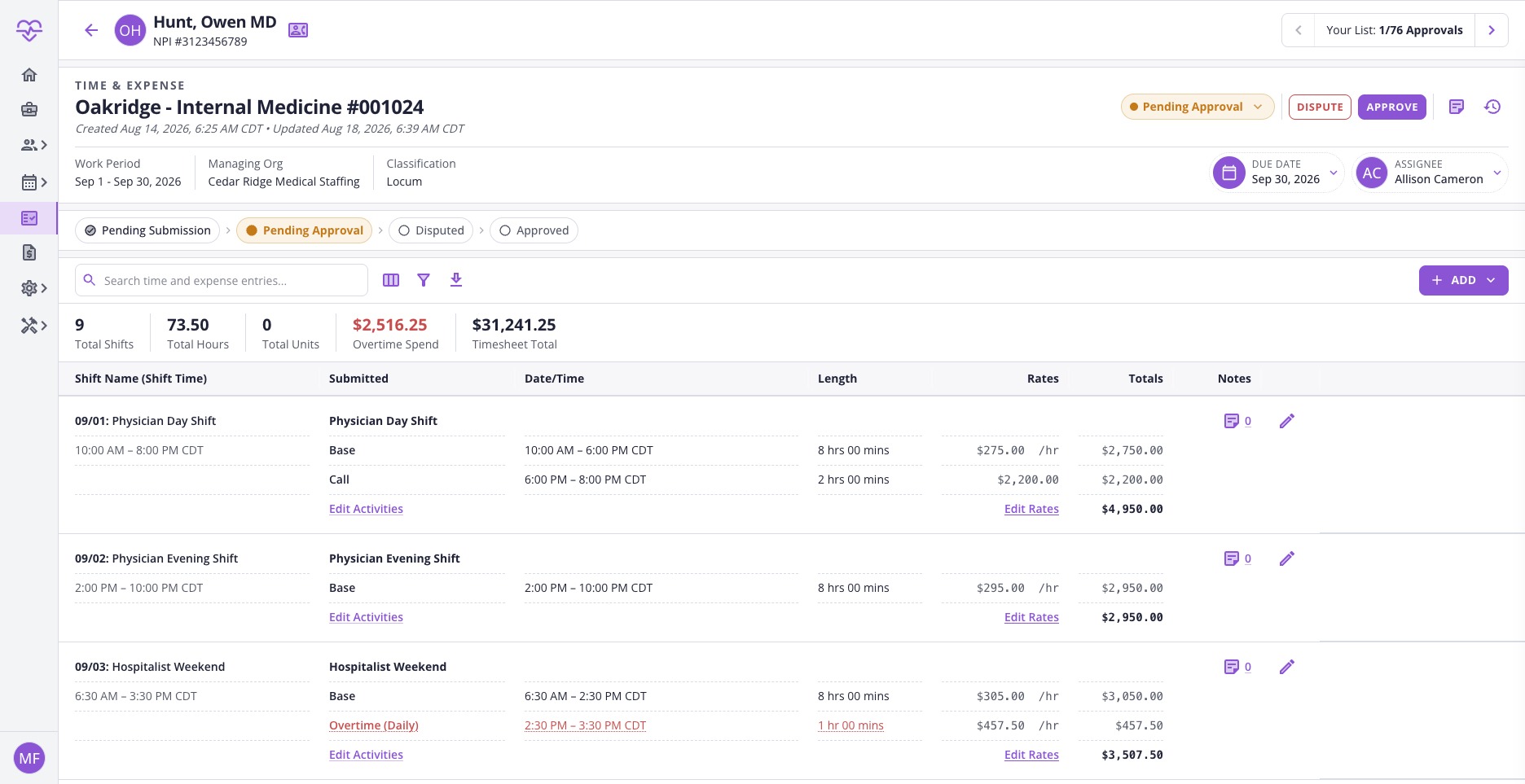
Solution 2/2
Clicking into a timesheet reveals a full entry-level breakdown. Each shift includes the shift type, scheduled time, submitted activities, and corresponding rates, while accounting for weekend and holiday differentials so every entry is fully contextualized.
I redesigned the Add Time and Add Expense forms to simplify complex entries into clear, structured steps. Users select staff, practice, and dates, then define shift or expense details through dynamic fields that adapt as needed. Time entries support multiple activities (Base and Call, for example) stacked within a single shift. Expense entries support units, pay codes, and receipt uploads in a single flow.
Built-in notes and edge-case toggles for scenarios like multi-day shifts or missed work keep the process flexible without sacrificing completeness.
09/29: Hospitalist Night
09/29, 5:00 PM – 09/30, 5:00 AM PDT
Hospitalist Night
Base
09/29, 7:00 PM – 09/30, 6:00 AM PDT
11 hrs 00 mins × $295.00 /hr
$3,540.00
Overtime (Daily)
09/30, 6:00 AM – 7:00 AM PDT
1 hr 00 mins × $442.50 /hr
$ 442.50
Total
$3,982.50